
How to Check MOT Mileage History Online
Check MOT mileage history online, understand MOT readings, spot inconsistencies and compare dated service records to assess a vehicle’s mileage timeline.

An MOT history check shows mileage readings recorded at tests, not a continuous record of every mile driven. To check MOT mileage history, enter the vehicle’s registration number in the MOT history service and review the readings listed for each test.
These readings are useful, but gaps between tests leave periods of the vehicle’s use unrecorded. Compare MOT entries with dated service records to build a clearer timeline and spot readings that go backwards or appear inconsistent. A discrepancy is a reason to investigate, not proof by itself that the odometer has been altered.
This guide explains how to find and interpret MOT mileage history, what the records can and can’t tell you, and how to cross-check readings against service documents. You’ll also learn how far back records go in Great Britain and Northern Ireland, and how to assess a discrepancy before making a decision about a vehicle.
Key Takeaways
- Look for mileage that decreases or changes in a way the dates and vehicle history do not readily explain; treat it as a prompt for closer review, not a conclusion.
- Use the dates between MOT tests to assess the pattern of recorded use, while remembering that readings are snapshots rather than a continuous log.
- Service invoices and maintenance records can add useful checkpoints when you compare their dated mileage entries with MOT readings.
- Learn how record coverage varies across the UK, and where a Mileage Blocker Device is relevant for controlled vehicle testing rather than mileage correction.
How to spot inconsistent mileage or possible odometer discrepancies
MOT mileage readings are recorded on each test date, but they don’t guarantee that the odometer is accurate. Treat each entry as a snapshot, then compare the dates and figures across the vehicle’s history. A falling reading needs investigation, not an immediate conclusion.
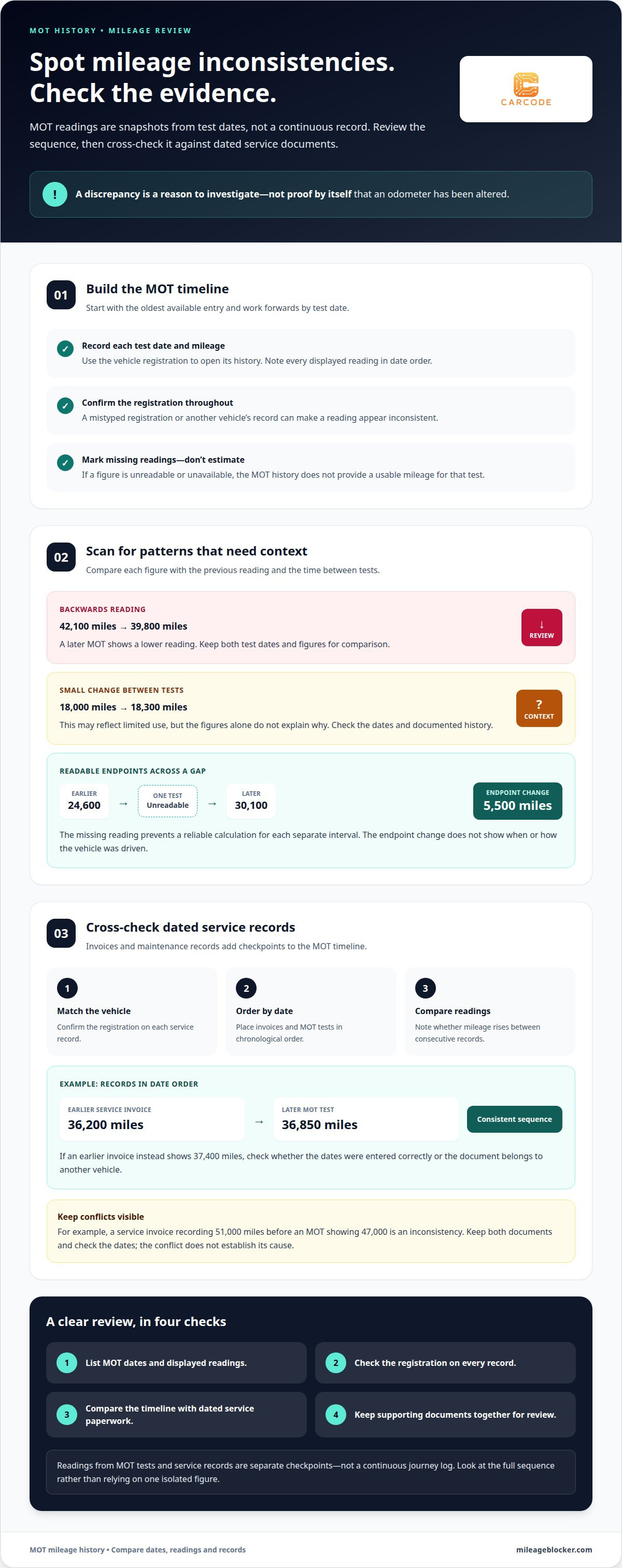
Start with the oldest available MOT entry and work forwards by date. Check that the vehicle’s registration matches throughout, then note the mileage at each test. Compare each figure with the previous reading to identify decreases, unusually small changes or long gaps that need context.
- Look for a backwards reading. For example, a vehicle recorded at 42,100 miles at one MOT and 39,800 miles at a later test shows a clear inconsistency. Record both test dates and figures for comparison.
- Check the pattern between tests. A change from 18,000 to 18,300 miles may reflect limited use, but the figures alone don’t explain why. Compare the dates and consider the vehicle’s documented history.
- Match the registration carefully. A mistyped registration or a record for another vehicle can make a reading appear wrong. Confirm the registration displayed for each entry before drawing conclusions.
Next, compare any unusual MOT entry with dated service invoices or maintenance records. If an invoice records 51,000 miles before an MOT shows 47,000, keep both documents and check the dates. The conflict is evidence of an inconsistency, but it doesn’t establish its cause.
Look for patterns rather than relying on one isolated figure. A sequence that rises consistently provides different evidence from a single decrease followed by later readings that rise again. Keep the relevant MOT dates, mileage figures and service documents together for a clear review.
MOT mileage readings and miles driven between tests
Each MOT mileage figure is a snapshot from the test date, not a continuous record. Use the vehicle’s registration number to open its history, then note the dates and readings in order. The service also shows whether each test passed or failed and when the next MOT is due.
To assess miles driven between tests, subtract the earlier reading from the later one. For example, a change from 24,600 to 30,100 miles means 5,500 miles were recorded between those test dates. The result describes the interval, not when or how the vehicle was driven. A longer gap also means more time passed between recorded snapshots.
An entry marked unreadable or unavailable means the MOT history doesn’t provide a usable mileage figure for that test. It can’t show how far the vehicle travelled during that interval, so compare the surrounding entries with dated service records instead.
If a figure appears incorrect, contact the MOT test centre that recorded the test. Provide the vehicle registration, test date and displayed mileage, along with relevant paperwork such as a service invoice. Ask the centre to review the entry and explain how it handles corrections.
Use a consistent sequence for each registration:
- Record every MOT date and its displayed mileage.
- Calculate the difference between consecutive readable figures.
- Mark unreadable entries rather than estimating a value.
- Compare intervals with dated service records and retain any supporting documents.
For example, if the history shows 24,600 miles, an unreadable test, then 30,100 miles, the total change across the readable endpoints is 5,500 miles. The missing reading prevents a reliable calculation for each separate interval.
Mileage readings don’t establish whether a vehicle was legally driven between tests. A major MOT defect can affect whether a vehicle may be driven, so check the applicable rules before using it. In the UK, a vehicle with an expired MOT may be driven directly to a garage for a pre-booked MOT test or for repairs required to pass the MOT.
The Driver and Vehicle Standards Agency says a driver can be fined up to £1,000 for driving a car without a valid MOT, except when travelling to a pre-booked test or to have repairs made after a failed MOT.
Cross-checking MOT and service mileage
To check MOT mileage history against service records, arrange the documents by date. MOT history shows the mileage reported at each test, while invoices provide additional dated readings. Compare records for the same vehicle and note whether the figures form a consistent timeline.
Start with the vehicle registration shown on each invoice or certificate. Then compare the document date with the nearest MOT test date. A service record dated before a test would generally be expected to show lower mileage than the later test entry.
- Match the vehicle: confirm the registration on each service record.
- Order the evidence: place invoices and MOT tests by date.
- Compare readings: note whether mileage rises between consecutive records.
- Keep discrepancies visible: record conflicting dates and figures without changing them.
For example, an invoice dated before an MOT test might show 36,200 miles, while the test records 36,850. That sequence is consistent. If the earlier invoice instead shows 37,400, first check whether the dates were entered correctly or the document belongs to another vehicle.
When checking MOT mileage history, consider all the records rather than relying on one mismatch. A later invoice may clarify whether mileage continued rising after an unusual test entry. Keep original documents together so the dates, registration and readings are easy to compare.
Service paperwork and MOT entries are separate checkpoints, not a continuous journey log. Together, they provide a clearer timeline when vehicle details, dates and readings match. You can then identify any unresolved conflict precisely for further discussion about the vehicle’s history.
For vehicles with records in Northern Ireland, account for the different certificate access route when gathering evidence. MOT certificates can’t be downloaded through this service. You can apply for a duplicate certificate on NI Direct while the MOT is valid, but not after it expires. If you need a certificate to resolve a mileage sequence, check its availability before relying on it as a document to retrieve later. Keep any certificate or other record you already have with dated invoices, and note which readings appear in each document. This helps distinguish missing paperwork from an actual mileage inconsistency.
How far back do UK MOT mileage records go
Record coverage depends on the vehicle’s test location and class. In Great Britain, MOT history for cars, motorcycles and vans is available for tests done since 2005. For HGVs, trailers, buses and coaches, records are available for tests done since 2018.
Northern Ireland has a separate start date. Its MOT history service shows test results from 2017. A vehicle tested there before 2017 may have no earlier result in the online service, even if its owner holds older paperwork.
Age also affects what appears. Cars under 3 years old may not have had an MOT test yet, so they may not appear in the DVSA record. In England, Scotland and Wales, cars need their first MOT by the third anniversary of registration. Northern Ireland cars need their first MOT at four years, according to the Driver and Vehicle Standards Agency.
Use the vehicle’s registration number to find the available record, then check the earliest test date shown. For example, a car with its first MOT in 2019 may have a continuous online history from that test, but the service cannot show MOT readings from before it was tested.
For a vehicle with a history spanning regions, check which country carried out each test. A car previously tested in Northern Ireland may have no online MOT entries before 2017, while its later Great Britain tests may appear from their test dates. The record’s start date reflects available tests, not necessarily when the vehicle first entered service.
If the online timeline starts later than expected, distinguish missing MOT entries from missing vehicle history. Older service invoices, maintenance records or certificates may provide dated mileage evidence outside the online MOT record. Keep those documents alongside the displayed entries when reviewing the vehicle’s timeline.
MileageBlocker.com
MileageBlocker.com sells electronic calibration tools and offers a fitting service for vehicle testing and off-road use. These are relevant when a test requires mileage not to accumulate while the hardware is active. They aren’t tools for correcting an inaccurate MOT history entry.
A specialized odometer freezer prevents mileage from being recorded while active; mileage correction changes a recorded value. For testing, the distinction matters: the calibration tool is designed not to alter a stored odometer value. It doesn’t remove the need for accurate records or responsible use.
For a vehicle history review, MOT and service documents remain the evidence of recorded mileage. An electronic calibration device can’t explain an inconsistency, amend an MOT entry or establish the vehicle’s actual mileage. Consider its testing purpose separately from any review of the vehicle’s documented history.
The installation service provides fitting support for vehicle testing. Vehicle electronics and compatibility vary by model, year and generation, so the hardware must match the exact vehicle. Don’t assume fitting or operating details are the same across different vehicles.
An electronic odometer tool can also be used to manage recorded road mileage, avoid lease limits or conceal mileage use. Keep mileage records transparent; the hardware isn’t a substitute for accurate documentation and won’t resolve conflicting MOT and service readings. Assess an unexplained discrepancy separately from any testing equipment.
For information about an odometer calibration device or fitting, contact MileageBlocker.com.
Frequently Asked Questions
Does an MOT history check show mileage?
Yes. Available MOT test records include the mileage recorded at each test. Use the dated entries to see how the figures change over time, but remember that there’s no continuous mileage log between tests. For a fuller picture, compare the history with dated paperwork, such as a maintenance invoice or previous test documentation.
Can I check MOT history with just the registration number?
Yes. You need the vehicle’s registration number to access its MOT history. Enter it carefully, especially if it contains characters that could be mistaken for similar letters or numbers. If the service returns no result, check the registration against the vehicle’s documents before assuming its MOT history is unavailable.
What information does the UK MOT history check show about mileage?
The history shows mileage recorded at available MOT tests, alongside each test’s date and result. It provides a sequence of reported readings, not a record of every journey. An entry can help establish the recorded mileage on that test date, but it won’t explain how the vehicle was used between tests.
Article by
Pav Tomaszevicz
Pav Tomaszevicz is Chief Editor at MileageBlocker.com and works closely with the Carcode technical team on content covering vehicle electronics, CAN and CAN-FD systems, mileage blocker compatibility, installation and product development. His articles draw on practical product development, technical support, installation experience and ongoing research into modern vehicle electronics. Content may use AI-assisted drafting and research, but technical information is reviewed against Carcode's product knowledge and real-world experience before publication
About the author
MileageBlocker TeamThe MileageBlocker Technical Team covers vehicle electronics, CAN and CAN-FD systems, mileage blocker compatibility, installation and product developments.
View author profile →