
The Ultimate Guide to Km Mileage in Imported Vehicles
Understand km mileage on imported vehicles. Learn how to convert kilometres to miles accurately, avoid recording errors, and interpret odometer readings.
Could a vehicle’s km mileage appear inconsistent because its records use different distance units? An imported vehicle’s reading in kilometres will usually have a higher number than the equivalent distance in miles. The figures can describe the same distance, so check the unit before comparing them.
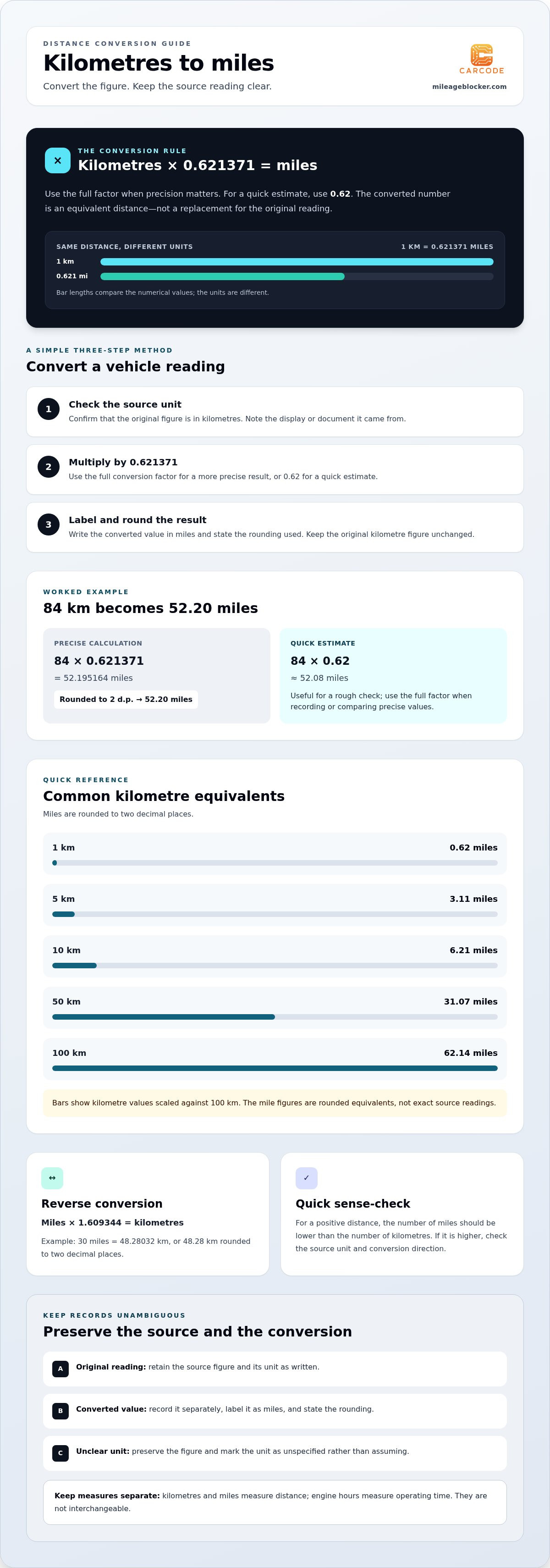
To convert kilometres to miles, multiply the kilometre figure by 0.621371. Using 0.62 gives a quick estimate, while the longer factor gives a more precise result. Keep the original reading unchanged, label the converted value as miles and state how you rounded it.
This guide explains how to convert km mileage, gives common kilometre-to-mile values for reference and shows how to record source readings alongside their converted equivalents. These steps help avoid confusing a change in units with a change in distance.
Key Takeaways
- Understand what km mileage means and why the unit matters when reading vehicle information.
- Convert kilometres to miles using a straightforward calculation.
- Use the reference table to check common kilometre-to-mile equivalents.
- Keep the original figure distinct from any converted value in vehicle records.
What Does KM Mileage Mean, and How Is It Different from Miles?
KM mileage is a distance recorded or stated in kilometres. “Km” is the standard abbreviation for kilometre. A mile is a different unit of distance. Both units can describe the same journey or vehicle use, but their numerical values differ and cannot be compared directly without conversion.
One kilometre is approximately 0.621371 miles. The unit shown beside a figure is therefore essential: 100 km and 100 miles do not represent the same distance. For more background, see this kilometre definition and conversion.
This short demonstration shows an odometer display being reprogrammed. It does not explain how to convert distance units.
Why do vehicle distance figures appear in different units?
The unit depends on the display or record where the figure appears. An imported vehicle may show kilometres on its instrument display, while a separate document states miles. The number by itself does not identify the unit. Before comparing figures, check the unit shown at the source and record it alongside the value. This helps distinguish a difference in units from a difference in distance.
Is km mileage the same as engine hours?
No. Kilometres and miles measure distance travelled; engine hours measure how long an engine has operated. They describe different things, so you cannot convert one into the other using the kilometre-to-mile factor. A vehicle’s distance and engine-hour figures may both provide context, but they are not equivalent measures. The related Engine Hours to Miles guide explains the distinction further.
For a clear record, keep the original figure and its unit, then label any converted figure separately. Conversion changes how the distance is expressed, not the distance itself.
How Do You Convert KM Mileage to Miles?
To convert a kilometre reading into miles, multiply it by 0.621371. Keep the input and output units clear throughout the calculation.
For a vehicle reading, follow these steps:
- Check the source and confirm that the original figure is in kilometres.
- Multiply the kilometre value by 0.621371.
- Round the result to a useful precision and label it as miles.
For example, 84 km multiplied by 0.621371 gives 52.195164 miles. Rounded to two decimal places, the converted figure is 52.20 miles. Keep 84 km as the original reading. The result is its calculated equivalent, not a replacement for the source figure.
What is the quickest way to convert kilometres in your head?
For a quick estimate, multiply by 0.62 instead of the full factor. An 84 km reading then comes to approximately 52.08 miles. This is useful for a rough check, but use the full factor and a calculator when recording or comparing values and greater precision matters.
How do you convert miles back to kilometres?
For the reverse conversion, multiply the miles figure by 1.609344. For example, 30 miles converts to 48.28032 km, or 48.28 km rounded to two decimal places. Check the source unit first so you use the correct factor and do not reverse the calculation. For product-related questions, see the MileageBlocker.com by Carcode FAQ.
Common KM Mileage Conversions: Examples and a Quick Reference Table
Use this table to check common distances without calculating each one. The mile equivalents are rounded to two decimal places for easier comparison.
| Kilometres | Equivalent miles |
|---|---|
| 1 km | 0.62 miles |
| 5 km | 3.11 miles |
| 10 km | 6.21 miles |
| 50 km | 31.07 miles |
| 100 km | 62.14 miles |
The table values are rounded equivalents, not exact source readings.
How should converted mileage be rounded?
Choose the level of precision for the task. A whole-mile figure may be enough for a quick comparison, while two decimal places can make a written record clearer. Keep the original reading unchanged, and label the converted value in miles with the rounding used. This separates the precision of the calculation from the level of detail shown in your record.
For example, 73 km converts to 45.360083 miles. Rounded to two decimal places, that is 45.36 miles. The extra digits are part of the calculation, but do not need to appear in a concise note.
How can you check a conversion result?
First confirm that the calculation starts with kilometres and that the result is labelled as miles. As a quick sense-check, for a positive distance the number of miles should be lower than the number of kilometres. If the result is higher, check whether you reversed the conversion factor or entered the wrong unit. This catches common errors before a value is added to a record.
How to Read KM Mileage Clearly in Vehicle Information
When a vehicle record includes an original reading and a converted equivalent, preserve both in a consistent format. For example, note the document or display that supplied the original figure, then enter the conversion separately. A reader can then trace the source value and distinguish it from a calculation.
Keep engine-hour information in a separate field from distance readings. It describes a different measure and should not be mixed into a mileage record.
How can you avoid mixing kilometres and miles?
Use the same record format for each entry, with separate fields for the source value, source unit and converted value. If a document gives a figure without a clear unit, preserve it as written and mark the unit as unspecified. Do not assume it is kilometres or miles. Keeping the uncertainty visible prevents it from affecting later comparisons.
How should you treat rounded conversions?
Make clear that a rounded converted figure is a calculated equivalent, not the exact value shown by the vehicle or source document. Retain the original entry unchanged, and use the same stated precision when comparing converted figures. This makes small differences easier to interpret without implying that a rounded number is more precise than it is.
Where can readers find answers about MileageBlocker.com?
For product-related questions, the MileageBlocker.com FAQ is a separate reference. Keep product enquiries distinct from your vehicle’s distance records.
Before finalising a record, check that you have:
- Confirmed the unit shown by the source.
- Kept the original reading distinct from any calculated value.
- Identified the unit of the converted figure.
- Stated how you rounded the converted value.
Make Clear Units Part of Your Record-Keeping
Before entering figures in a vehicle record, set a simple convention: preserve the source wording and unit, then add any converted value in a separate, clearly labelled field. For example, record “84 km” as the source figure and “52.20 miles” as its converted equivalent. This makes it easier to review records from different displays and documents later.
Use the same approach when updating a spreadsheet, comparing service paperwork or organising a vehicle file. Consistent labels make km mileage easier to interpret and help prevent differently expressed figures from being mistaken for a change in distance.
For product-related questions, visit the MileageBlocker.com FAQ. For distance records, keep the source reading and any conversion separate, with the units clearly stated.
Frequently Asked Questions
How many miles are in one kilometre?
One kilometre is approximately 0.621371 miles. For a quick estimate, use 0.62, but use the longer factor when you need a more precise calculation. When reviewing a vehicle document, check whether its figure is in kilometres or miles before comparing it with another record.
How do I convert 100 km mileage to miles?
Multiply 100 kilometres by 0.621371 to get 62.1371 miles. Rounded to two decimal places, the equivalent is 62.14 miles. Label the result as miles and keep the original figure marked as kilometres so it is clear which value came from the source.
Is km mileage the same as miles on a vehicle?
No. Kilometres and miles are different units of distance, so their numerical readings are not interchangeable. A figure labelled “km” is in kilometres; one labelled “mi” or “miles” is in miles. Check the unit before comparing figures from different displays or documents.
How do I convert miles to kilometres?
Multiply the number of miles by 1.609344 to calculate kilometres. For example, 40 miles × 1.609344 equals 64.37376 km, which rounds to 64.37 km to two decimal places. In this direction, the input is miles and the result is kilometres.
Should I round km mileage when converting it to miles?
Round the converted result to suit its purpose, but leave the original source reading unchanged. Two decimal places can make a calculated value clear in a written comparison; a rough estimate may be enough for an informal check. Do not present a rounded conversion as the vehicle’s exact source reading. If precision matters, retain the full calculation separately.
About the author
MileageBlocker TeamThe MileageBlocker Technical Team covers vehicle electronics, CAN and CAN-FD systems, mileage blocker compatibility, installation and product developments.
View author profile →